
From Message to Order: How to Turn Customer Conversations into Real Sales with Croco Bird
It is 9 p.m. Two hours ago your team launched a WhatsApp offer campaign, and replies are pouring in. One customer asks about the price. Another wants to know if the product is in stock. A third is ready to buy right now. Meanwhile an Instagram message has landed, and an email from a long-time customer says his shipment is late.
Who answers whom? Who checks the stock? Who logs that complaint so it is not forgotten by tomorrow?
If you talk to customers on more than one channel, this scene is familiar. And the problem is rarely effort: your team may be working hard. The problem is that everything is scattered. Messages live in one place, customer records in another, stock levels in a third, and follow-ups in someone’s notebook or memory. The more scattered the work, the more messages slip through and the more sales opportunities quietly disappear.
This guide follows a customer step by step, from the first message to an order recorded in your own system, and shows how Croco Bird ties those steps together. We will cover three connected themes: managing conversations from one place, moving AI from simply replying to taking action, and turning WhatsApp campaigns into sales.
Step 1: Bring every conversation into one place
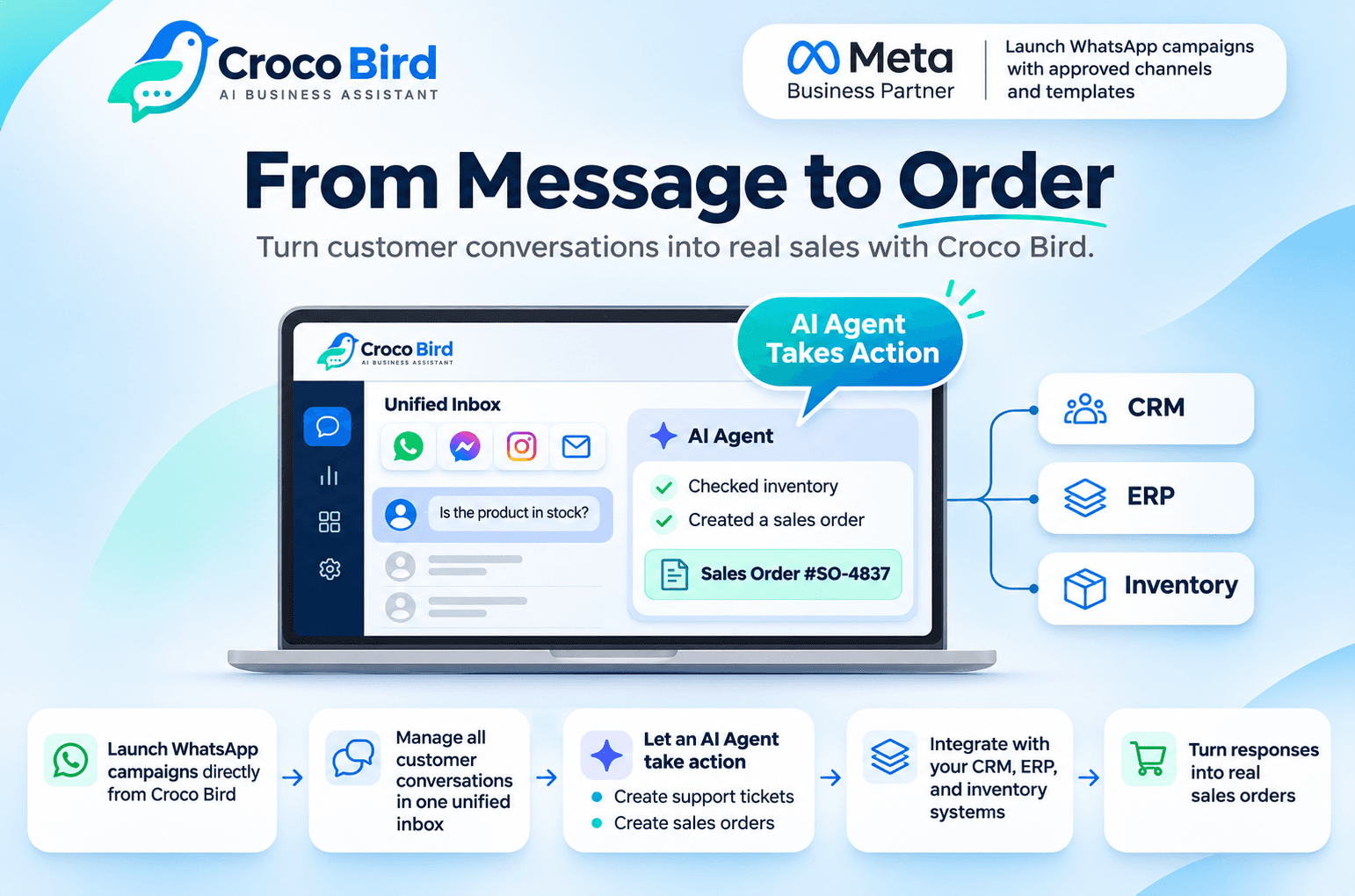
Before AI or campaigns, your team needs one thing: clear visibility. Croco Bird brings WhatsApp, Messenger, Instagram and email into a single unified inbox. An agent opens one screen and sees every customer waiting for a reply, instead of hopping between four apps and wondering whether a colleague already answered.
A unified inbox is more than a place to read messages. It is a way to run the work:
- Clear ownership: conversations can be assigned to team members, so everyone knows who owns which customer and the dreaded “I thought you had it” disappears.
- Follow-up from the first message: no conversation is left without an owner or an ending.
- Performance reporting: insight into conversation volume and team performance, so managers decide with data instead of impressions. Do we need another agent? When does the pressure peak?
The business payoff: faster replies, customers who stop repeating their problem to three different people, and a team that spends its time serving customers rather than hunting for their messages.
Step 2: Connect the conversation to customer data and sales opportunities
A conversation alone is not enough. When a customer writes “Where is my order?”, your agent needs to know who the customer is, what they bought and where the order stands, without asking the customer to start over and without opening another system.
That is why Croco Bird integrates with CRM, ERP and inventory systems, so customer details and orders appear right where the conversation happens. The integration adds three things:
- Full context: agents reply knowing the customer’s history, which makes every answer sharper and more professional.
- Sales opportunity management: track prospects and the stages of each deal, so a message of interest does not turn into a lost lead because nobody followed up.
- Hosting flexibility: dedicated hosting is available for each customer, a good fit for companies with specific data-management requirements.
The business payoff: less manual re-entry, fewer mistakes, and organized follow-up instead of relying on memory.
Step 3: Let an AI Agent do more than reply
We all know the chatbot: it answers frequently asked questions, then its job is over. That is useful, but it leaves the most time-consuming part of the work untouched: what happens after the answer.
The AI Agent in Croco Bird is closer to a virtual employee. It learns your company’s information, understands the customer’s request, and, through the integrations you enable, takes action on your systems. Two examples show the difference.
- Customer support. A customer writes that the product they bought is faulty. A traditional chatbot replies, “Sorry for the trouble, our team will contact you.” The AI Agent understands the issue, records the complaint and creates a Support Ticket in your CRM, so your support team finds the case ready, with details, when their day begins.
- Sales. A customer asks about a product and wants to buy. The AI Agent presents suitable options, checks availability in inventory, helps the customer choose, and once the customer confirms, creates a Sales Order in your system.
All inside one conversation, without the customer jumping between systems and without an employee retyping the same data.
The business payoff: less manual entry, a faster path from conversation to system, and a team freed up for the cases that truly need a human touch and human expertise.
A note on accuracy: the actions an AI Agent can perform depend on the integrations and permissions configured for each company, so what it can and cannot do on your systems is defined during setup.
Step 4: Turn WhatsApp campaigns into sales
Sending a campaign to thousands of customers is not the win. The win is when replies become orders. As an official Meta partner, Croco Bird lets you launch WhatsApp campaigns directly from the platform, using approved channels and templates and in line with WhatsApp’s policies, and then manages everything that happens after you hit send.
Imagine a company that sells home appliances and wants to promote an offer on a new washing machine:
- Launch: the marketing team sends an offer message through an approved WhatsApp template to a customer segment.
- Reply: a customer writes, “How much is the washer? Is it available in white?” The message lands in the unified inbox.
- Understand and verify: the AI Agent answers the price and specification questions and checks that the requested colour is in stock through the integration with the company’s system.
- Confirm: the customer decides to buy and confirms the order.
- Execute: the AI Agent creates a Sales Order in the company’s system, according to the enabled integrations.
- Follow up: any customer who needs special attention or negotiation is handled by the responsible sales rep from the same inbox, with everything recorded and visible to the team.
The campaign did not end at “sent.” It moved smoothly from campaign to conversation to order, without a customer getting lost on the way.
The business payoff: campaign spend turns into managed replies, replies turn into sales, and you can see which message led to which order.
Reminder: follow WhatsApp’s policies, including approved templates and customer opt-in where required.
What changes inside your company
- Business owners: fewer lost messages, and sales opportunities that do not evaporate.
- Customer service managers: clear conversation assignment and reports that reveal team performance and workload.
- Marketing and sales managers: WhatsApp campaigns that end in orders, and opportunities tracked through their stages.
- Operations and digital transformation leaders: conversations connected to CRM and ERP, and actions executed instead of waiting for manual entry.
Five questions to ask any conversation platform before you choose
- Does it bring all my customer channels into one inbox, or just one channel?
- Does it connect to my existing systems (CRM, ERP, inventory)?
- Is its AI limited to replying, or can it perform real actions?
- Does it manage WhatsApp campaigns and what comes after, in the same place?
- Does it give me reports on team performance and conversation volume?
If a platform answers yes to all five, you are looking at a system, not an isolated tool.
How to get started
The best way to evaluate Croco Bird is to see it on a scenario that looks like your own business. Book a demo and bring one real case: a campaign you want to launch, a type of complaint that keeps recurring, or a sales process that keeps stalling. Then watch how the unified inbox works, what the AI Agent can do on your systems, and how the platform connects to what you already have.
Frequently asked questions
Is an AI Agent the same as a chatbot?
No. A chatbot answers questions. An AI Agent understands the request and, through integrations, can take actions on company systems, such as creating a ticket or a Sales Order.
Which channels does the platform unify?
WhatsApp, Messenger, Instagram and email in one inbox.
Can it connect to our existing systems?
Yes. Croco Bird integrates with CRM, ERP and inventory systems, and available actions depend on each customer’s setup.
Can we launch bulk WhatsApp campaigns from the platform?
Yes. Campaigns are launched directly from Croco Bird, an official Meta partner, using approved channels and templates and in line with WhatsApp’s policies.
Is dedicated hosting available?
Yes, dedicated hosting is available for each customer to suit data-management requirements.